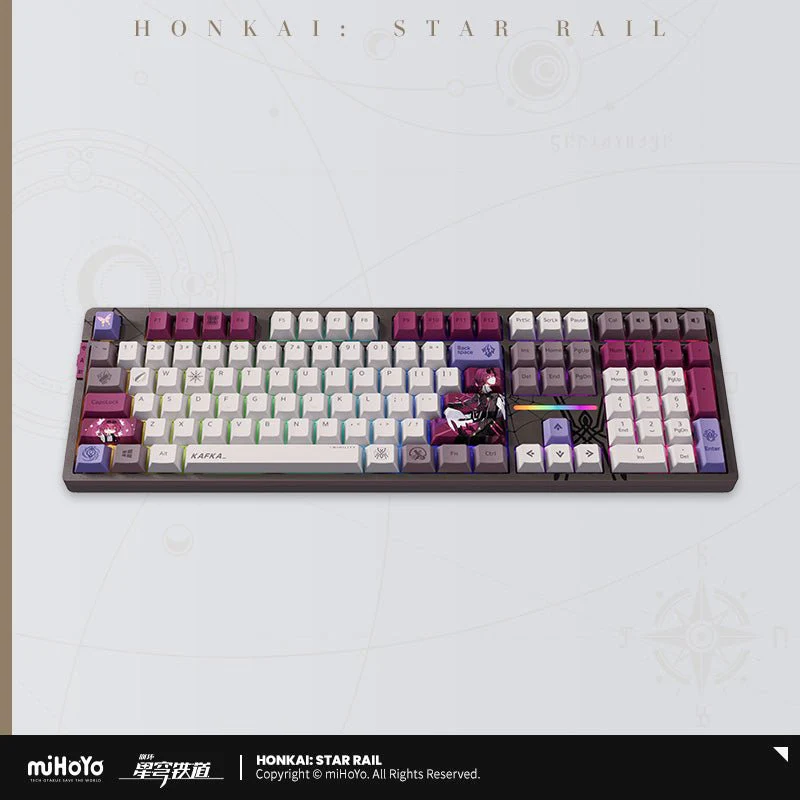
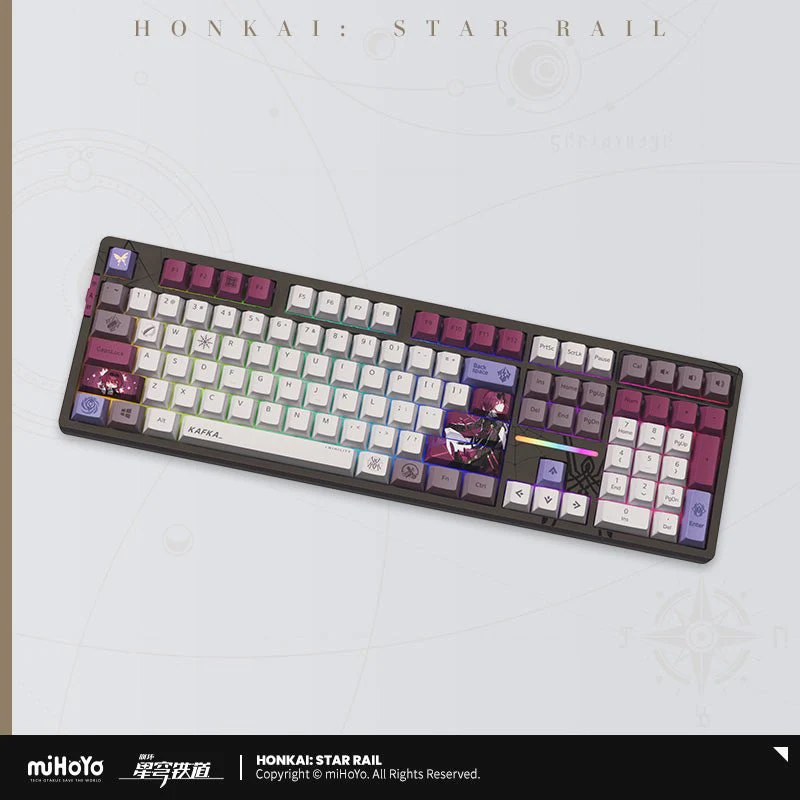
[OFFICIAL] Honkai: Star Rail Kafka RGB Backlit Mechanical Keyboard

Honkai: Star Rail Kafka RGB Backlit Mechanical Keyboard
Specification:
- 108-Key: 440 x 136.60 x 43.66mm
- 87-Key: 363.8 x 136.6 x 43.66mm
Keycap: PBT
Keycap Craft: 5-Sided Sublimation
Frame: ABS
Feet: 2 Stages
Backlit: 16 Milloin Customizable RGB Colors
Battery Capacity: 8000 mAh
Keyswitch Seat: Kailh
Keyswitch Option: Crystal Burgundy Red Switch, Autumn Brown Switch
Connection: Bluetooth 5.0 / 2.4G wireless / Type-C
System Support: Windows / MacOS / Linux / Android
Contents:
- Keyboard
- USB-A to USB-C data cable
- User Manual (three templates)
- Warranty Certificate
- 2.4G Receiver
- Keycap Puller
- 5 switches of the same type as the keyboard
- Dust Cover

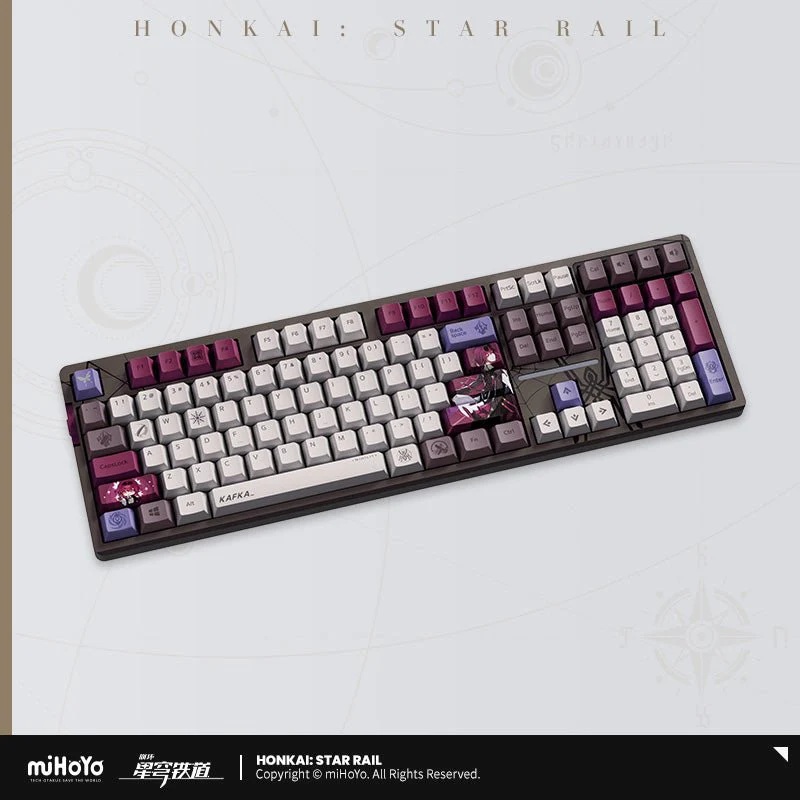
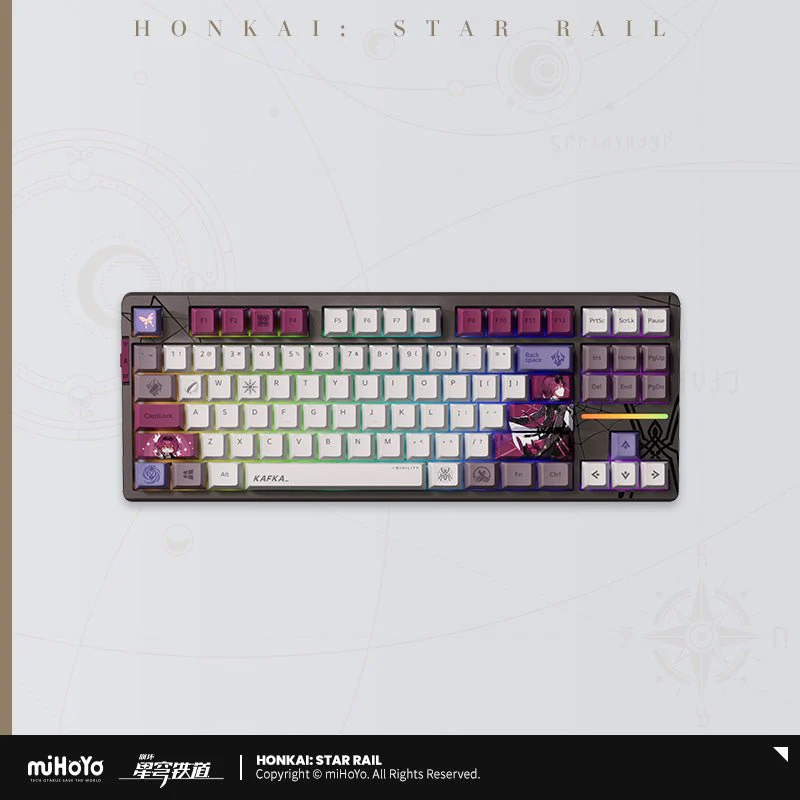
87-Key Compact Keyboard Layout: Saves more desktop space

Themed Keycaps
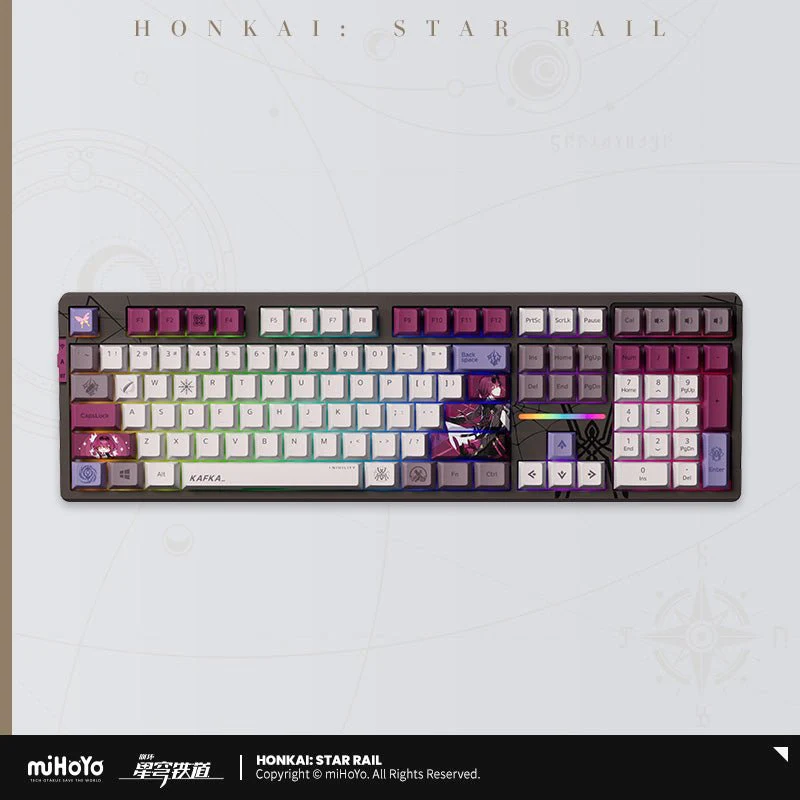
Comes with Kafka-themed keycaps with RGB backlight
Special Keycaps for ESC key: Laser-engraved translucent keycaps
Note: the lighting effect on the following picture is for your reference only. Please refer to the final product or video demo for the actual effect.

▲ All keycaps are divided into 4 categories according on height (R1-R4)
Additional Keycaps x 5: When replacing keycaps, they must be matched according to category.
Incorrect replacement may cause damage to the keycaps and switches!
Keyswitch Options

Crystal Burgundy Red Switch
- Type: Linear
- Operating Force: 37±10gf
- Pre-travel Distance: 1.3±0.5mm
- Total Travel Distance: 3.4±0.4mm
- Lifespan: 50M Keystrokes
- Characteristic: “hifi” Sound, Smooth Handfeel
Autumn Scenery Switch
- Type: Paragraph
- Operating Force: 50±150gf
- Pre-travel Distance: 1.8±0.4mm
- Total Travel Distance: 3.6±0.3mm
- Lifespan: 80M Keystrokes
- Characteristic: Distinct Tactile Feedback, Ethereal/Natural Sound
Connection Method

Wireless three-mode connection
Bluetooth 5.0 / Wireless 2.4G / Type-C three connection modes support multiple systems to meet the needs of different scenarios.
QUICK START:
2.4G WIRELESS CONNECTION:
- Take out the receiver from the storage slot on the right side
- Plug the receiver into the USB port of your computer
- Pull the mode switch on the left to 2.4G mode
BLUETOOTH CONNECTION:
- Pull the mode switch on the left to Bluetooth mode
- Long press Fn + number key 1, 2 or 3 to start pairing, the long indicator light flashes quickly during pairing
- Supports pairing with up to 3 devices. Press Fn + number keys 1,2or 3 to switch devices.
WIRED CONNECTION:
- Insert the Typc-C cable into the keyboard port
- Connect the cable to the computer
- Move the mode Switch on the left to the middle
TIPS:
WIN: Unable to use when Win key is locked, Option key in MAC mode
ALT: Command key in MAC mode
Switch between windows and MAC mode:
Fn + A = Switch to Windows mode
Fn + S = Switch to MAC mode
Backlit Mode

16 Million Adjustable RGB Colors
Rich light effects, lower light position design suitable for more keycaps.
LIGHTING EFFET:
LIGHT CUSTOMIZATION FUNCTIONS:
Press Fn + ~ to call up the Custom backlight, which only supports a set of Custom memory lights.
CUSTOM LIGHTING EDITOR:
- Press Fn + ~ to switch to the custom light mode;
- Press Fn + ~ again to start editing the light. At this time, press the key to be defined. The color of the keyboard light changes with each press.
- After editing, press Fn + ~ again to save the edited light.
Battery Capacity

8000mAh Super Long Battery Life
All keys have no rollover, 1000Hz high return rate, paired with a large 8000mAh battery, and support SMART SPEED low-latency technology, bringing an e-sports-level low-latency experience.
Hot-Swappable Base

All-Key Hot-Swappable Base
It supports hot-swappable mechanical shafts, making it easy for users to replace the shafts and adapt to most shafts on the market to create your own exclusive equipment.
FAQ
Q: Why doesn't my Win key work?
A: When the Win key is locked after pressing the Fn+Win key, the Win key cannot be triggered and used. At this time, the Win indicator light on the keyboard is on, and it can be unlocked by pressing Fn+Win again.
Q: Why are my Win key and Alt key reversed and F1-F12 not responding or turning into function keys?
A: After pressing Fn+S, the keyboard will switch to MAC mode. At this time, under the Windows system, the Win key and Alt key will be reversed, and Fn+F1-F12 will become function keys; press Fn+A to switch Return to Windows mode.

Notes:
- Please do not use alcohol to rub the UV-printed casing.
- Mechanical keyboards are not waterproof or dustproof.
- Key caps can be cleaned with detergent after taken off from the keyboard. Make sure they are all totally dry before installing them back in the keyboard.
- Use brush to remove dust from the keyboard.
- Do not expose it to strong sunlight and high heat for long term.
Product Information
Product Information
Shipping & Returns
Shipping & Returns
[OFFICIAL] Honkai: Star Rail Kafka RGB Backlit Mechanical Keyboard
[OFFICIAL] Honkai: Star Rail Kafka RGB Backlit Mechanical Keyboard
Honkai: Star Rail Kafka RGB Backlit Mechanical Keyboard
Specification:
- 108-Key: 440 x 136.60 x 43.66mm
- 87-Key: 363.8 x 136.6 x 43.66mm
Keycap: PBT
Keycap Craft: 5-Sided Sublimation
Frame: ABS
Feet: 2 Stages
Backlit: 16 Milloin Customizable RGB Colors
Battery Capacity: 8000 mAh
Keyswitch Seat: Kailh
Keyswitch Option: Crystal Burgundy Red Switch, Autumn Brown Switch
Connection: Bluetooth 5.0 / 2.4G wireless / Type-C
System Support: Windows / MacOS / Linux / Android
Contents:
- Keyboard
- USB-A to USB-C data cable
- User Manual (three templates)
- Warranty Certificate
- 2.4G Receiver
- Keycap Puller
- 5 switches of the same type as the keyboard
- Dust Cover
87-Key Compact Keyboard Layout: Saves more desktop space
Themed Keycaps
Comes with Kafka-themed keycaps with RGB backlight
Special Keycaps for ESC key: Laser-engraved translucent keycaps
Note: the lighting effect on the following picture is for your reference only. Please refer to the final product or video demo for the actual effect.
▲ All keycaps are divided into 4 categories according on height (R1-R4)
Additional Keycaps x 5: When replacing keycaps, they must be matched according to category.
Incorrect replacement may cause damage to the keycaps and switches!
Keyswitch Options
Crystal Burgundy Red Switch
- Type: Linear
- Operating Force: 37±10gf
- Pre-travel Distance: 1.3±0.5mm
- Total Travel Distance: 3.4±0.4mm
- Lifespan: 50M Keystrokes
- Characteristic: “hifi” Sound, Smooth Handfeel
Autumn Scenery Switch
- Type: Paragraph
- Operating Force: 50±150gf
- Pre-travel Distance: 1.8±0.4mm
- Total Travel Distance: 3.6±0.3mm
- Lifespan: 80M Keystrokes
- Characteristic: Distinct Tactile Feedback, Ethereal/Natural Sound
Connection Method
Wireless three-mode connection
Bluetooth 5.0 / Wireless 2.4G / Type-C three connection modes support multiple systems to meet the needs of different scenarios.
QUICK START:
2.4G WIRELESS CONNECTION:
- Take out the receiver from the storage slot on the right side
- Plug the receiver into the USB port of your computer
- Pull the mode switch on the left to 2.4G mode
BLUETOOTH CONNECTION:
- Pull the mode switch on the left to Bluetooth mode
- Long press Fn + number key 1, 2 or 3 to start pairing, the long indicator light flashes quickly during pairing
- Supports pairing with up to 3 devices. Press Fn + number keys 1,2or 3 to switch devices.
WIRED CONNECTION:
- Insert the Typc-C cable into the keyboard port
- Connect the cable to the computer
- Move the mode Switch on the left to the middle
TIPS:
WIN: Unable to use when Win key is locked, Option key in MAC mode
ALT: Command key in MAC mode
Switch between windows and MAC mode:
Fn + A = Switch to Windows mode
Fn + S = Switch to MAC mode
Backlit Mode
16 Million Adjustable RGB Colors
Rich light effects, lower light position design suitable for more keycaps.
LIGHTING EFFET:
LIGHT CUSTOMIZATION FUNCTIONS:
Press Fn + ~ to call up the Custom backlight, which only supports a set of Custom memory lights.
CUSTOM LIGHTING EDITOR:
- Press Fn + ~ to switch to the custom light mode;
- Press Fn + ~ again to start editing the light. At this time, press the key to be defined. The color of the keyboard light changes with each press.
- After editing, press Fn + ~ again to save the edited light.
Battery Capacity
8000mAh Super Long Battery Life
All keys have no rollover, 1000Hz high return rate, paired with a large 8000mAh battery, and support SMART SPEED low-latency technology, bringing an e-sports-level low-latency experience.
Hot-Swappable Base
All-Key Hot-Swappable Base
It supports hot-swappable mechanical shafts, making it easy for users to replace the shafts and adapt to most shafts on the market to create your own exclusive equipment.
FAQ
Q: Why doesn't my Win key work?
A: When the Win key is locked after pressing the Fn+Win key, the Win key cannot be triggered and used. At this time, the Win indicator light on the keyboard is on, and it can be unlocked by pressing Fn+Win again.
Q: Why are my Win key and Alt key reversed and F1-F12 not responding or turning into function keys?
A: After pressing Fn+S, the keyboard will switch to MAC mode. At this time, under the Windows system, the Win key and Alt key will be reversed, and Fn+F1-F12 will become function keys; press Fn+A to switch Return to Windows mode.
Notes:
- Please do not use alcohol to rub the UV-printed casing.
- Mechanical keyboards are not waterproof or dustproof.
- Key caps can be cleaned with detergent after taken off from the keyboard. Make sure they are all totally dry before installing them back in the keyboard.
- Use brush to remove dust from the keyboard.
- Do not expose it to strong sunlight and high heat for long term.
Original: $247.99
-70%$247.99
$74.40Product Information
Product Information
Shipping & Returns
Shipping & Returns
Description
Honkai: Star Rail Kafka RGB Backlit Mechanical Keyboard
Specification:
- 108-Key: 440 x 136.60 x 43.66mm
- 87-Key: 363.8 x 136.6 x 43.66mm
Keycap: PBT
Keycap Craft: 5-Sided Sublimation
Frame: ABS
Feet: 2 Stages
Backlit: 16 Milloin Customizable RGB Colors
Battery Capacity: 8000 mAh
Keyswitch Seat: Kailh
Keyswitch Option: Crystal Burgundy Red Switch, Autumn Brown Switch
Connection: Bluetooth 5.0 / 2.4G wireless / Type-C
System Support: Windows / MacOS / Linux / Android
Contents:
- Keyboard
- USB-A to USB-C data cable
- User Manual (three templates)
- Warranty Certificate
- 2.4G Receiver
- Keycap Puller
- 5 switches of the same type as the keyboard
- Dust Cover
87-Key Compact Keyboard Layout: Saves more desktop space
Themed Keycaps
Comes with Kafka-themed keycaps with RGB backlight
Special Keycaps for ESC key: Laser-engraved translucent keycaps
Note: the lighting effect on the following picture is for your reference only. Please refer to the final product or video demo for the actual effect.
▲ All keycaps are divided into 4 categories according on height (R1-R4)
Additional Keycaps x 5: When replacing keycaps, they must be matched according to category.
Incorrect replacement may cause damage to the keycaps and switches!
Keyswitch Options
Crystal Burgundy Red Switch
- Type: Linear
- Operating Force: 37±10gf
- Pre-travel Distance: 1.3±0.5mm
- Total Travel Distance: 3.4±0.4mm
- Lifespan: 50M Keystrokes
- Characteristic: “hifi” Sound, Smooth Handfeel
Autumn Scenery Switch
- Type: Paragraph
- Operating Force: 50±150gf
- Pre-travel Distance: 1.8±0.4mm
- Total Travel Distance: 3.6±0.3mm
- Lifespan: 80M Keystrokes
- Characteristic: Distinct Tactile Feedback, Ethereal/Natural Sound
Connection Method
Wireless three-mode connection
Bluetooth 5.0 / Wireless 2.4G / Type-C three connection modes support multiple systems to meet the needs of different scenarios.
QUICK START:
2.4G WIRELESS CONNECTION:
- Take out the receiver from the storage slot on the right side
- Plug the receiver into the USB port of your computer
- Pull the mode switch on the left to 2.4G mode
BLUETOOTH CONNECTION:
- Pull the mode switch on the left to Bluetooth mode
- Long press Fn + number key 1, 2 or 3 to start pairing, the long indicator light flashes quickly during pairing
- Supports pairing with up to 3 devices. Press Fn + number keys 1,2or 3 to switch devices.
WIRED CONNECTION:
- Insert the Typc-C cable into the keyboard port
- Connect the cable to the computer
- Move the mode Switch on the left to the middle
TIPS:
WIN: Unable to use when Win key is locked, Option key in MAC mode
ALT: Command key in MAC mode
Switch between windows and MAC mode:
Fn + A = Switch to Windows mode
Fn + S = Switch to MAC mode
Backlit Mode
16 Million Adjustable RGB Colors
Rich light effects, lower light position design suitable for more keycaps.
LIGHTING EFFET:
LIGHT CUSTOMIZATION FUNCTIONS:
Press Fn + ~ to call up the Custom backlight, which only supports a set of Custom memory lights.
CUSTOM LIGHTING EDITOR:
- Press Fn + ~ to switch to the custom light mode;
- Press Fn + ~ again to start editing the light. At this time, press the key to be defined. The color of the keyboard light changes with each press.
- After editing, press Fn + ~ again to save the edited light.
Battery Capacity
8000mAh Super Long Battery Life
All keys have no rollover, 1000Hz high return rate, paired with a large 8000mAh battery, and support SMART SPEED low-latency technology, bringing an e-sports-level low-latency experience.
Hot-Swappable Base
All-Key Hot-Swappable Base
It supports hot-swappable mechanical shafts, making it easy for users to replace the shafts and adapt to most shafts on the market to create your own exclusive equipment.
FAQ
Q: Why doesn't my Win key work?
A: When the Win key is locked after pressing the Fn+Win key, the Win key cannot be triggered and used. At this time, the Win indicator light on the keyboard is on, and it can be unlocked by pressing Fn+Win again.
Q: Why are my Win key and Alt key reversed and F1-F12 not responding or turning into function keys?
A: After pressing Fn+S, the keyboard will switch to MAC mode. At this time, under the Windows system, the Win key and Alt key will be reversed, and Fn+F1-F12 will become function keys; press Fn+A to switch Return to Windows mode.
Notes:
- Please do not use alcohol to rub the UV-printed casing.
- Mechanical keyboards are not waterproof or dustproof.
- Key caps can be cleaned with detergent after taken off from the keyboard. Make sure they are all totally dry before installing them back in the keyboard.
- Use brush to remove dust from the keyboard.
- Do not expose it to strong sunlight and high heat for long term.